

Our Promotion

Save, Сэкономьте, Ahorrar
By popular request, the Butterfly Ball has been extended until February 1. (14 Jan 2026)

By popular request from our participants, we are extending the Butterfly Ball until February 1, so that everyone who wishes to take part has enough time.

Technical Questions

How to transfer your license from one computer to another
More
16 Feb 2026 10:02 #57814 by hellene
 
How to Transfer Soft Mozart to Another Computer
Step 1 – On the OLD Computer

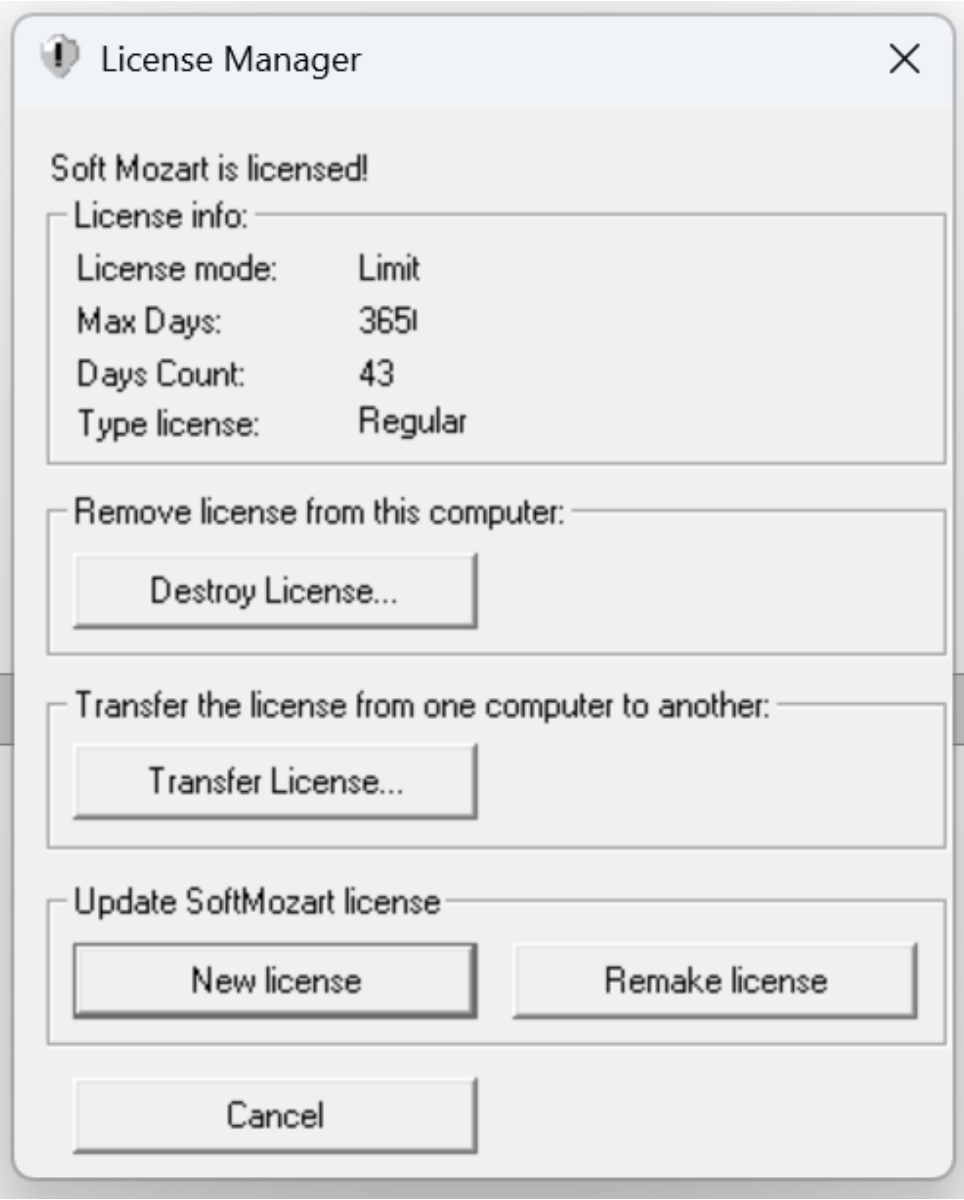
    Open License Manager.

    Click Transfer License… under
    “Transfer the license from one computer to another.”

A transfer window will appear.
Step 2 – On the NEW Computer

    Install Soft Mozart.

    Open any module.

    Copy the long Registration ID displayed.

Step 3 – Back to the OLD Computer

    Paste the Registration ID from the new computer into the transfer window.

    Click Transfer.

    The program will generate an Activation Key.

Step 4 – Activate on the NEW Computer

    Enter the generated Activation Key on the new computer.

    The license will be transferred successfully.


Back to the Mozart

Please Log in or Create an account to join the conversation.

Time to create page: 0.305 seconds